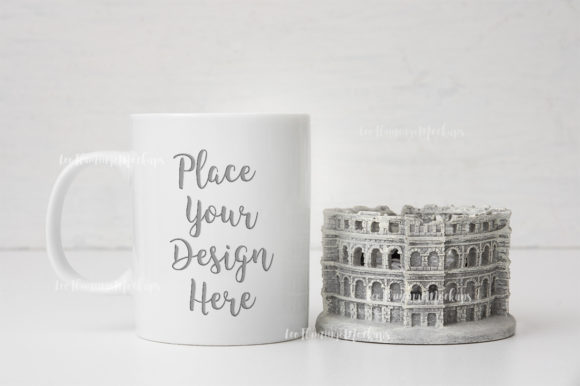
Sell Your Vision with a White Sublimation Coffee Mug Mockup
You’ve finished a crisp design for an 11oz coffee mug. The colors are balanced, the typography is on point, and the concept is ready for prime time. Now comes the often-overlooked bottleneck: presenting it in a way that feels tangible, professional, and desirable. A flat digital file on a transparent background rarely conveys the weight and texture of a physical mug. This is where a carefully crafted mockup bridges the gap between concept and reality. The White Sublimation Coffee Mug Mockup provides an efficient, high-fidelity visual context that lets your artwork shine without demanding hours of complex scene-building in Photoshop.
This isn’t just another layered template. It’s a real-photo scene designed specifically for creatives who value speed and realism. With a neutral, soft aesthetic, it places your design on a classic 11oz white mug, the most versatile and widely used substrate in the sublimation industry. Whether you are selling digital products on Etsy, pitching a branded merch line to a client, or building a portfolio, this mockup serves as a reliable presentation layer that elevates your work.
Understanding the Core Strengths of a Real-Photo Scene
What differentiates this mockup from fully rendered 3D models is its authenticity. It begins with a high-resolution stock photograph, capturing natural light, subtle shadows, and the tactile texture of a ceramic surface. The background and the mug are fixed on the same layer, meaning the composition is locked. While this may sound limiting, it is actually a powerful advantage for specific workflows.
Because the scene is pre-built and unchangeable, you eliminate the risk of accidentally moving elements or distorting the perspective. You also remove the steep learning curve associated with complex 3D rendering software. This simplicity is intentional. It allows you to focus entirely on the design itself. The included PSD file is stripped down to a single Smart Object layer set to Multiply blend mode. This setup is incredibly straightforward once you understand how to work within its constraints.
The technical specifications reinforce its professional utility. With a resolution of 3504 x 2336 pixels at 300 dpi, the output is sharp enough for high-quality print catalogs, large social media graphics, and detailed blog headers. The RGB color mode ensures vibrant display on screens, which is crucial for digital marketing and e-commerce platforms.
Streamlining E-Commerce Listings and Social Media Content
For online sellers, the visual consistency of product listings directly correlates with trust and conversion rates. Shoppers want to see exactly how a design will look on a finished product. Using the White Sublimation Coffee Mug Mockup provides that clarity. The neutral, minimal background ensures that your design remains the focal point, reducing visual noise that can distract potential buyers.
Consider an Etsy shop preparing a seasonal collection. Instead of photographing ten physical mugs under inconsistent lighting, you can use this single mockup scene to showcase ten different designs instantly. Each listing will share a cohesive, professional aesthetic that builds brand recognition. The same applies to Instagram grids and Pinterest boards, where a consistent visual style is essential for engagement.
The provided high-resolution JPG is immediately usable for marketplaces that prefer simple image uploads, while the editable PSD offers flexibility for adding text overlays, branding, or promotional badges directly onto the scene. This dual-file structure saves time without sacrificing quality.
Building a Cohesive Brand Aesthetic
Consistency is the backbone of memorable branding. When every product image shares the same lighting, angle, and background, your audience subconsciously registers higher quality and professionalism. This mockup’s soft, minimal style aligns perfectly with modern design trends. It does not compete with your artwork but instead complements it, making your designs pop naturally.
If you run a design studio or a print-on-demand business, using a standard mockup for all your mock presentations creates a unified portfolio. Clients scrolling through your offerings will immediately recognize your style, which reinforces trust and credibility.
Practical Applications for Client Presentations and Portfolios
Freelance designers and design agencies frequently encounter the challenge of selling abstract concepts. A client might struggle to visualize how a flat logo or pattern translates onto a curved, physical object. Presenting your work on a realistic coffee mug mockup removes that ambiguity. It provides context and scale, helping clients make faster decisions with greater confidence.
This specific mockup is particularly well-suited for proposals and mood boards. Because it is a real photo, the lighting and shadows are accurate. Clients see how their design interacts with the cylindrical shape of the mug, which is a critical detail often missed in flat mockups or distorted renders. You are not just selling a design; you are selling a finished product experience.
Using this tool in client communication also signals competence. It shows that you have invested in the presentation layer of your workflow, which often justifies higher pricing for your design services. It reduces the back-and-forth cycle of "what will it look like?" and moves the conversation toward "when can we launch?"
A Technical Guide to Flawless Mockup Execution
Working with this mockup is simple, but a few technical nuances can make a significant difference in the final result. The PSD file uses a Smart Object layer set to Multiply blend mode. Understanding how Multiply interacts with your design is essential for achieving a realistic composite.
Multiply blends your design with the underlying white of the mug. White areas of your design become transparent, while darker areas overlay onto the ceramic texture. This means that a design with a solid white background will essentially disappear, leaving only the foreground elements visible. This is perfect for artwork that benefits from a transparent or integrated look, such as watercolor effects, typography, or line art.
Mastering the Multiply Layer for Optimal Design Display
Because the layer is set to Multiply, you need to consider contrast carefully. Bright and vibrant colors will display beautifully, but very light pastels or white text may lose visibility against the white ceramic surface. To work around this, I recommend placing a subtle shadow or a colored background block within your design file before placing it into the Smart Object. This gives your lighter elements the necessary contrast to stand out.
The Smart Object itself is a non-destructive layer, meaning you can edit your design repeatedly without degrading the image quality. You can also apply filters and adjustments inside the Smart Object without affecting the background scene. This is a standard professional workflow that allows for maximum flexibility within a fixed composition.
Working Within the Fixed Composition
It is important to remember that the cup and background are on a single layer. You cannot move the mug or adjust the lighting after the fact. This fixed scene is a deliberate choice for speed and consistency. You don’t need to worry about aligning perspectives or matching shadows. The heavy lifting is done for you.
However, this also means you should choose your designs wisely. Images with extremely long vertical elements might not fit perfectly within the mug’s curvature. The provided help file JPG includes a clear outline of the Smart Object boundaries, so review that before you start. This small step ensures you place your artwork correctly the first time, saving you from unnecessary trial and error.
Strategic Use Cases for Different Professionals
The White Sublimation Coffee Mug Mockup is not limited to graphic designers. Its simplicity and realism make it a versatile asset across multiple fields.
- Educators and Trainers: If you teach sublimation or surface design courses, this mockup is an excellent teaching tool. Students can focus on their designs without getting distracted by complex software techniques. You can use it to demonstrate color theory, placement, and the importance of resolution in a real-world context.
- Digital Product Sellers: For those who create printable mug design bundles, this mockup is your storefront. It allows you to display multiple variations of your work in a visually appealing way that drives sales. The high-resolution JPG is perfect for creating attractive pin images on Pinterest.
- Marketing Teams: Need to test different promotional messages on merchandise? Use the editable PSD to quickly swap out text and slogans. You can create social media teasers, launch graphics, and promotional banners using the same high-quality base image, ensuring a consistent campaign look.
- Corporate Gift Planners: Presenting branded merchandise options to stakeholders is easier when they can see a realistic representation. A clean, professional mockup helps decision-makers visualize the end product, facilitating faster approval for bulk orders.
Final Considerations for Mockup Selection
When evaluating a digital mockup, factors like flexibility, resolution, and authenticity often clash. This particular product leans heavily into authenticity and ease of use, sacrificing full 3D manipulation for a streamlined, high-quality output. This trade-off is ideal for professionals who need reliable, repeatable results without the overhead of complex software.
The accessibility of the files is another strong point. The PSD is compatible with Photoshop CS4 and above, covering a vast range of software versions. Additionally, the mention of PIXLR online editor means that users without a Photoshop subscription can still leverage the Smart Object functionality. This democratizes access to professional-grade presentation tools.
Finally, do not overlook the included instructions. The note about hidden layers is critical; the scene is protected to prevent accidental alterations to the background lighting. Taking a few minutes to read the help file ensures that you maximize the potential of the mockup without frustration. The file you receive will be clean, without watermarks, ready for immediate commercial or personal use.
Incorporating a reliable mockup into your workflow is not an expense; it is an investment in how your work is perceived. The White Sublimation Coffee Mug Mockup provides a practical, beautiful, and efficient way to present your sublimation designs to the world, helping you communicate your vision with clarity and professionalism.