Five Coffee Mug Mockups, 5 Smart Mugs: A Practical Guide for Designers and Marketers
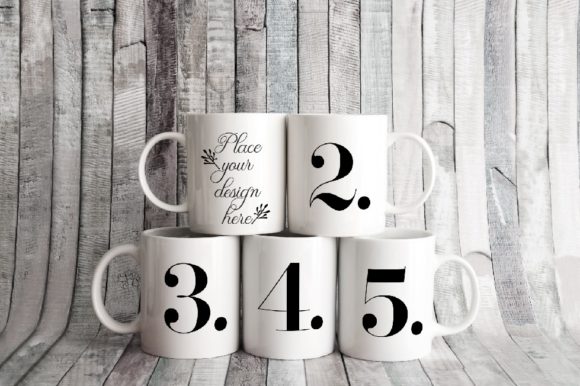
Presenting product designs or brand artwork on realistic objects is one of the most effective ways to communicate value to clients, customers, or social media followers. The Five Coffee Mug Mockups, 5 Smart Mugs set offers a ready-to-use solution for anyone who needs to showcase designs on drinkware without staging a photoshoot. This package includes one high-resolution JPG (3504 x 2336 pixels at 300 dpi) and one PSD file with five smart object layers, allowing you to place your own artwork onto each mug individually. The scene itself is a soft, rustic real-photo composition with all five mugs and the background locked on a single layer, so the arrangement stays consistent every time you use it.
Understanding what this product is and where it fits into your broader creative or marketing workflow will help you use it more efficiently. Whether you are a freelancer preparing client presentations, a small business owner testing new merchandise designs, or a content creator building themed social media posts, these mockups can save you hours of setup time while delivering professional-grade visuals.
Where Five Coffee Mug Mockups Fit in a Real Workflow
Every project involving product visuals follows a sequence: concept development, design creation, mockup production, client or stakeholder review, and final publication. The Five Coffee Mug Mockups, 5 Smart Mugs set enters at the mockup production stage, but its value extends both before and after that point.
Before you open the PSD file, you should have your artwork prepared. Because the mockup supports five separate smart objects, you can design five different variations of a single concept, five complementary patterns that form a collection, or five distinct brand logos to compare side by side. Preparing your assets in advance, with each design sized appropriately for a mug surface, ensures that the placement process is quick and that the final result looks intentional rather than stretched or misaligned.
During the mockup stage, the beauty of this set lies in its simplicity. The PSD file uses smart objects, which means you double-click a layer, paste or place your design, save, and the update appears automatically on the corresponding mug in the scene. Because the five mugs and the background are merged onto one layer, you cannot accidentally shift the camera angle or rearrange the composition. This constraint is actually a benefit: it guarantees that every mockup you produce from this file will maintain the same framing, lighting, and rustic atmosphere. Consistency across a series of mockups strengthens your brand identity and makes your portfolio or product gallery feel cohesive.
After you have placed your designs and saved the final images, the output lends itself to a wide range of uses. You can upload individual mug shots to an online store, create a composite image showing an entire collection for a lookbook, or post lifestyle visuals on Instagram and Pinterest. The 300 dpi resolution and generous pixel dimensions give you enough quality for both digital display and small-format print, such as catalog pages or product cards.
How This Mockup Set Interacts with Other Tools and Resources
The Five Coffee Mug Mockups, 5 Smart Mugs files work with Adobe Photoshop CS4 and higher, as well as with Pixlr, the free online image editor. This broad compatibility means you are not locked into expensive software if you are working on a tight budget or using a borrowed computer. Pixlr handles smart objects similarly to Photoshop, so the workflow remains largely the same.
If you incorporate other design tools such as Canva, Affinity Designer, or Procreate into your process, you can prepare your mug artwork in those applications and then import the final PNG or JPEG layers into the PSD file. This integration allows you to keep your creative pipeline flexible: use vector tools for crisp logos, raster tools for textured illustrations, or photo editors for realistic mockups, then combine everything inside the smart object layers.
For marketers and small business owners who rely on scheduling tools like Later, Buffer, or Hootsuite, the mockup output fits naturally into a content calendar. Because all five mugs appear in a single scene, you can create a batch of social media graphics in one session. Export each mug as a separate crop, or use the full composition as a carousel post where each slide highlights a different design. The rustic background works well with warm-toned brand palettes, lifestyle themes, and handmade or artisanal product lines.
Preparation Before You Open the PSD
Read the included help file and instructions before launching Photoshop or Pixlr. The PSD file has layers that are hidden by default, and the instructions explain exactly which layers correspond to which mug. Taking two minutes to understand the layer structure prevents confusion later. Prepare your five designs at matching dimensions, ideally around 1600 to 2000 pixels wide with a resolution of 300 dpi, so they fit the mug surface cleanly. Using consistent dimensions for all five variations saves you from having to resize each one individually within the smart object.
Placing Your Designs Efficiently
Open the PSD file in Photoshop or Pixlr. Locate the smart object layers for mugs one through five. Double-click the thumbnail of the first smart object layer, which will open a new document window. Place or paste your design into that window, resize and position it as needed, then save and close the window. The mockup scene will update automatically. Repeat this process for the remaining four mugs. Because the background and mugs are on the same layer, you do not need to worry about masking or blending—the smart object handles the mapping for you.
If you are using Pixlr, the process is similar: open the PSD, locate the smart object layers in the layers panel, double-click to edit, and replace the content. Pixlr may handle layer visibility slightly differently, so having the help file open as a reference is helpful.
Organizing Your Output Files
After you have placed all five designs, you can save the full composition as a high-resolution JPEG for portfolio use, or crop individual mugs if you need standalone images. To crop a single mug, use the rectangular marquee tool with a fixed ratio, zoom in to ensure clean edges, and export at full resolution. Name each file with a logical convention such as product-mug1-designA.jpg to keep your assets organized for future use.
Efficiency and Consistency in Your Workflow
One of the strongest advantages of using a pre-built mockup set like the Five Coffee Mug Mockups, 5 Smart Mugs is the elimination of repetitive setup. If you were to photograph five mugs yourself, you would need to manage lighting, focus, composition, and post-processing for each shot. With this digital file, all of those variables are fixed. Every image you produce from the same PSD will share the same lighting, color tone, perspective, and background. This consistency is invaluable when building a product catalog or social media grid where uniformity creates a professional impression.
For ongoing projects, such as a seasonal line of mug designs or a client who regularly updates their merchandise, you can reuse the same PSD file repeatedly. Replace the designs inside the smart objects, export fresh images, and maintain visual continuity across months or years. This approach also speeds up collaboration: you can share the PSD file with a colleague or client, and they can update the designs themselves without needing to understand complex layer masks or adjustment layers.
Quality Control and Long-Term Use
When evaluating any mockup resource, check the resolution and the realism of the scene. The 3504 x 2336 pixel dimensions at 300 dpi provide enough detail for most digital and light print applications. The rustic soft aesthetic suits brands that want to convey warmth, handcrafted quality, or a natural lifestyle. If your brand uses bright neon colors or a sleek modern palette, test one design first to see how it interacts with the scene’s lighting and shadow tones. The mockup’s fixed lighting may warm up cool-toned designs slightly, so adjust your artwork’s brightness or saturation in advance if needed.
For long-term use, store the original PSD file and the JPG together in a clearly named folder. Keep the help file accessible, especially if you do not use Photoshop or Pixlr frequently. Because the file is compatible with CS4 and later versions, you can open it even on older software, which is useful if you switch computers or work with a team that has varying software versions.
Use Cases Across Different Roles
Freelance designers can use these mockups to present multiple logo or pattern options to a client in a single image, making it easier for the client to compare and decide. Small business owners selling custom mugs can create a full product listing with five distinct designs without needing to produce physical samples for photography. Content creators and bloggers can produce themed sets for holidays, product launches, or brand collaborations, maintaining a consistent visual style across posts. Marketing teams can incorporate the mockups into A/B testing for ad creative, using the same scene but swapping out designs to measure audience response.
Even educators and workshop facilitators can benefit: use the mockup to teach students how smart objects work in Photoshop, or as a project template for a class assignment on product design. The file is a self-contained teaching tool that demonstrates layer structure, object placement, and realistic rendering without requiring a photography studio.
Final Observations on Integrating the Mockup into Your Routine
The Five Coffee Mug Mockups, 5 Smart Mugs set is a focused, practical asset. It does one thing well: it lets you place five designs onto realistic mugs in a single, beautiful scene with minimal effort. Its value multiplies when you treat it as a reusable template rather than a one-off graphic. Build it into your standard design toolkit alongside your logo templates, color palettes, and brand guidelines. When a new project requires mug visuals, you already know the format, the resolution, and the workflow.
By preparing your designs in advance, following the included instructions, and taking advantage of the smart object system, you can produce a batch of high-quality mockup images in under thirty minutes. That efficiency frees you to focus on the creative decisions that matter most, while the consistent, professional output builds trust with your audience and clients.