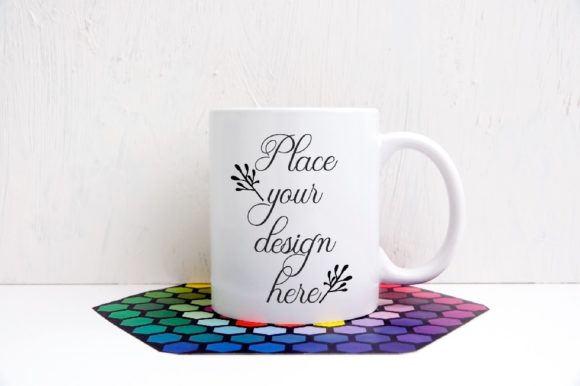
Black Metal Enamel Mug Mockup: A Practical Design Tool
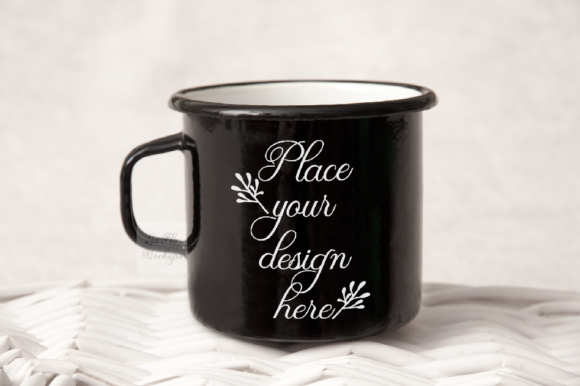
A black metal enamel mug mockup is a digital file that lets you place your artwork, text, or logo onto a realistic photograph of a rugged enamel mug. This particular mockup delivers a rustic, outdoorsy feel that works well for vintage-inspired designs, branding projects, or product presentations. The file includes one high-resolution JPG at 300 dpi (3504 x 2336 pixels) and one PSD file with a smart object layer, making it straightforward to insert your design using Photoshop CS4 or newer, or even the free online editor PIXLR.
The scene is a real photograph, meaning the mug and background are captured together on a single layer. The smart object layer applies your design with a multiply blending mode, so the metallic texture and shadows of the mug show through your artwork. This creates a natural, integrated look without requiring advanced editing skills. A help file with simple instructions is included, and it is worth reading before opening the PSD, since layers are hidden by default.
What Makes This Mockup Different
Mockups come in many forms, but this one stands out for its specific aesthetic. The black enamel finish and metal construction give the mug a durable, old-fashioned character. The background is fixed, so you cannot reposition the mug or change the setting. That limitation is actually a strength: the scene is already composed, lit, and styled, so you can focus entirely on placing your design and seeing how it reads on a tangible object.
The multiply blending mode is a deliberate choice. It means your design will inherit the mug’s highlights, shadows, and subtle surface variations. A flat white logo will appear slightly darkened and textured, matching the enamel surface. This gives presentations a grounded, believable look that is hard to achieve with a simple cutout or 3D render.
Why Different People Care About This Mockup
Not everyone approaches a mockup with the same goals. A beginner might value simplicity and clear instructions. An experienced designer may prioritize realism and flexibility. A small business owner could care about speed and commercial presentation. An educator might see it as a teaching tool for demonstrating how smart objects work. The same mockup serves different needs depending on who is using it and why.
For Beginners: Ease of Use and Clear Results
If you are new to mockups, this file offers a low-pressure way to learn. The PSD contains one smart object layer, and the instructions walk you through opening that layer, inserting your design, saving, and closing. There is no need to adjust lighting, perspective, or shadows. You do not have to match colors or worry about layer masks. The multiply blending mode handles the integration automatically.
A beginner might use this mockup to see how a simple monogram, a favorite quote, or a small illustration looks on a physical object. The result is immediately shareable on social media, a blog, or a personal portfolio. The learning value is high because you experience how a real photograph responds to a design overlay. You also gain familiarity with smart objects, a feature that appears in many professional workflows.
For Creators and Freelancers: Flexibility Within Constraints
Experienced users will appreciate that this mockup does not pretend to be something it is not. The fixed scene and single smart object mean you work within clear boundaries. That can be refreshing. Instead of spending time tweaking a 3D environment or masking out a background, you drop in your artwork and move on. The high resolution and 300 dpi output ensure that fine details remain sharp, even if you plan to use the image in print or on a large screen.
A freelance designer might use this mockup to present a logo concept for a coffee brand, an outdoor gear company, or a rustic-themed product line. The mug’s enamel texture and metal rim give the design a tactile quality that feels authentic. The same designer could also use it to showcase a vintage illustration or a hand-lettered phrase for a client who wants a rugged, nostalgic feel. Because the background is part of the scene, the presentation looks finished without additional styling.
For Small Business Owners and Entrepreneurs: Commercial Presentation
If you run a shop or sell products online, presentation matters. A mockup like this lets you show how your brand would appear on a physical item without holding inventory or paying for a photoshoot. You can create product mockups for social media posts, website banners, or printed catalogs. The rustic style suits businesses in the outdoor, craft beverage, camping, or heritage niches.
A small coffee roastery, for example, could place their logo on this mug and use the image in an Instagram campaign promoting a new blend. A maker of handmade soaps or balms might use it to suggest a camping or adventure theme. The cost is a one-time purchase, and the file can be reused as many times as needed for different designs. That makes it a practical investment for businesses that need consistent, on-brand visuals without ongoing photography costs.
It is important to remember the license terms: you can use the mockup to display your own designs and text for blogs, Instagram, shops, and web presentations, but you cannot sell, share, or claim the mockup file itself as your own work. This is standard for mockup licensing, and respecting it ensures you stay within legal boundaries while benefiting from the commercial use of your derived images.
For Educators and Bloggers: Teaching and Demonstrating
Teachers, workshop leaders, and content creators can use this mockup as a practical example in tutorials. The single smart object layer makes it easy to explain how mockups work, how blending modes affect design placement, and why resolution matters. The fact that the mug and background are on the same layer is a good talking point about working with real photo scenes versus constructed composites.
A blogger writing about branding or product photography could use the mockup to illustrate how a small business might prototype a product idea. An educator teaching a graphic design class could assign students to create a label or logo and then place it on this mug to see how it translates to a three-dimensional surface. The visual result is immediate and satisfying, which helps maintain engagement.
Practical Priorities: What to Consider
Different users weigh factors like ease of use, cost, quality, flexibility, and speed differently. Here is how these priorities apply to this specific mockup.
Ease of Use
This mockup is among the simplest to use. The smart object layer is clearly marked, and the instructions are straightforward. If you can open a PSD file, double-click a layer thumbnail, paste your design, save, and close, you can use this mockup. No prior experience with masks, adjustment layers, or complex file structures is needed.
Cost and Value
As a digital download, the cost is typically low, and the file provides repeated use. The high resolution means the output is suitable for both screen and print. For the price of a single coffee shop drink, you get a tool that can generate dozens of unique presentations. That kind of value appeals to freelancers, small business owners, and hobbyists alike.
Quality and Realism
The photograph is real, not a render. That gives the mockup an authenticity that synthetic backgrounds often lack. The lighting, shadows, and surface texture are natural. The multiply blending mode ensures your design integrates with the mug’s surface rather than floating on top. For clients and audiences accustomed to seeing real products, this realism builds trust.
Flexibility and Limitations
The fixed scene is both a strength and a limitation. You cannot reposition the mug, change the background, or adjust the lighting. If your design requires a different environment or angle, this mockup will not work. However, within its intended use case, the fixed composition saves time and eliminates guesswork. The best approach is to evaluate whether the rustic, single-mug scene matches the tone of your project before purchasing.
Speed and Reliability
Once you are familiar with the workflow, producing a final image takes a few minutes. The PSD opens quickly, the smart object responds instantly, and the multiply mode requires no manual adjustment. For social media posts where turnaround time matters, this reliability is valuable. You can create a polished visual in the time it takes to brew a cup of coffee.
Who Should Choose This Mockup
This mockup fits best if you need a ready-to-use scene that communicates a rugged, outdoorsy, or vintage feel. It matches projects involving camping, hiking, coffee, tea, craft beverages, homesteading, or rustic decor. It is also a good choice if you want to learn how smart objects work without dealing with complex layers or if you need a fast way to produce consistent product-style images for your brand or portfolio.
If your project requires a clean white background, a lifestyle setting with multiple props, or the ability to rotate or resize the mug, this mockup may not be the right fit. The fixed scene and single smart object mean you trade flexibility for speed and realism. Knowing that upfront helps you decide whether it aligns with your goals.
Long-Term Usefulness
A mockup like this does not become outdated. The product style is classic, and the photographic quality holds up over time. You can revisit the file years later to create new designs for new projects. The only requirement is that you keep the PSD file and the included instructions accessible. Because the file uses standard Photoshop features, it remains compatible with future versions of the software and with PIXLR as an online alternative.
For someone building a library of mockup resources, this one fills a specific niche. It is not a general-purpose tool, but it excels at what it is designed for. Having a focused, reliable mockup on hand means you can produce a certain look on demand without scrambling for a custom solution.
Final Thoughts on Using This Mockup
The black metal enamel mug mockup is a practical, no-fuss tool for displaying designs on a realistic object. It respects your time by keeping the workflow simple and the output professional. Whether you are a beginner learning the basics of smart objects, a freelancer presenting a logo to a client, a business owner creating social media content, or an educator teaching design concepts, this mockup delivers consistent results with minimal effort.
Take a moment to read the help file before opening the PSD. Understand that the mug and background are fixed and that your design will appear multiplied onto the surface. Then experiment with different types of artwork—bold text, fine line illustrations, or photographic elements—to see how the enamel texture interacts with each one. The more you use it, the more you will recognize when this particular scene is the right choice for your project.