New Year’s Safari Mug Mock Up – A Realistic Tool for Creatives and Marketers
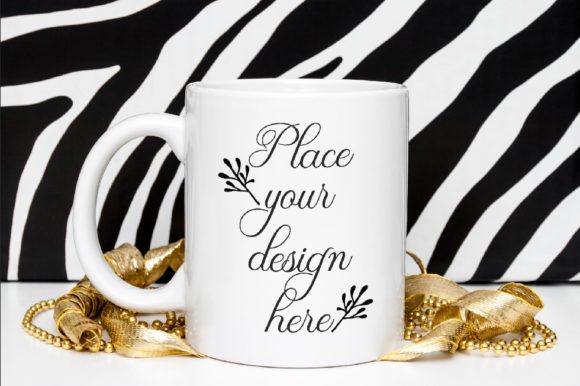
If you’ve ever tried to sell a design before it’s printed, you already know the challenge. You need something that looks real, feels polished, and gives your audience a true sense of what the finished product will look like. That’s where the New Year’s Safari Mug Mock Up comes in. It’s not just another template. It’s a photorealistic scene that lets you place your artwork or text onto a stylish 11oz mug, complete with a wintery, golden safari aesthetic that feels seasonal without being overly themed.
The product comes as a single high-res JPG and a layered PSD file with a Smart Object layer for easy image placement. The background and mug are locked together on one layer, so you don’t need to worry about moving objects around. You get a 300 dpi image at 3504 x 2336 pixels in RGB, which is plenty of resolution for social media, blog posts, shop listings, and presentations. The PSD works in Photoshop CS4 and later, and you can even use PIXLR online if you don’t have Photoshop installed. There’s also a help file with simple instructions, so even if you’re not a design pro, you can get your mock-up ready in a few minutes.
Where the New Year’s Safari Mug Mock Up Fits Into Real Projects
Mock-ups like this one get used in more ways than most people expect. It’s not just for showing a product before production. Think about the last time you posted a seasonal quote on Instagram, or wanted to test a new design idea without printing a single mug. That’s exactly the kind of situation where this file saves you time, money, and guesswork.
Because the scene already looks like a professional product photo, you can drop your design in and use the result as is. No need to build a set, arrange lighting, or hire a photographer. The golden winter backdrop fits naturally into December, January, and even late fall campaigns, so you get a longer seasonal window than you might think.
Social Media Content That Actually Stands Out
Creators and small business owners know the struggle of keeping a feed fresh. If you run an Instagram shop, a Facebook page, or even a Pinterest board centered around seasonal products, you need variety. Using the same flat image over and over makes followers scroll past. A lifestyle mock-up like this one breaks that monotony.
You can use the New Year’s Safari Mug Mock Up to post daily quotes, affirmations, or even short promotional messages without needing a new photoshoot each time. Swap out the design in the Smart Object, save your image, and you’ve got a fresh post in under five minutes. For bloggers, this works especially well if you’re writing about cozy winter routines, New Year’s resolutions, or gift ideas. A visual that feels real and warm pulls readers into the post before they even read the headline.
Product Previews for Shops and Etsy Listings
If you sell custom mugs, or if you’re thinking about adding mugs to your product line, you already know that listing photos can make or break a sale. A single well-styled mock-up often performs better than a dozen generic shots. The New Year’s Safari Mug Mock Up works particularly well for Etsy, Amazon Handmade, or independent shop websites because the scene feels natural and not overly staged. Customers can imagine the mug sitting on their own table, which helps them make a purchase decision faster.
One advantage here is the resolution. At 3504 pixels wide, you have enough detail to crop, zoom, or resize for different platforms without losing clarity. You can use the full image for your main listing photo or zoom in on the mug for a secondary image. Either way, you’re working from a consistent scene that keeps your shop looking cohesive.
Who Benefits Most From This Mock-Up
It’s easy to assume mock-ups are only for graphic designers. That’s not the case. Different people use this file in different ways, and the value changes depending on your goals.
Freelancers and Designers
If you offer custom mug designs as part of your services, you need a way to present concepts to clients without printing every draft. The Smart Object layer makes it fast to swap designs and show variations. You can send a client two or three different layouts in the same realistic scene, and they can picture the final result without imagination or guesswork. This reduces revision cycles and helps you close projects faster.
Small Business Owners and Entrepreneurs
Whether you run a print-on-demand store or a local gift shop, mock-ups help you test the market before you commit to inventory. You can gauge customer interest by posting a design on social media and seeing engagement. If people ask when they can buy it, you know you have a winner. If not, you try another design without wasting any physical materials. The New Year’s Safari Mug Mock Up pays for itself the first time it saves you from printing a design that doesn’t sell.
Educators and Workshop Leaders
If you teach design, marketing, or e-commerce, a real-world mock-up like this gives students something concrete to learn with. You can walk them through the process of placing a design, adjusting scale, and exporting for different platforms. Because the PSD file is straightforward and the help file is clear, students don’t get lost in complex layers. It’s a practical teaching tool that shows how professional product visualization actually works.
Hobbyists and Personal Creators
Not everyone who uses mock-ups is selling something. People make mugs for family gifts, holiday parties, or personal creative projects. The New Year’s Safari Mug Mock Up lets you preview a design for a friend’s gift before you place the order. If you’re making a mug as part of a New Year’s Eve party favor or a winter gathering, you can test fonts, colors, and layout without any pressure. It’s a low-stakes way to experiment and still end up with something shareable.
Practical Considerations Before You Use the Mock-Up
No tool is perfect for every situation, and being clear about what this mock-up can and can’t do helps you get the most out of it.
First, the mug and background are on the same layer. That means you cannot reposition the mug or change the background independently. If you need to place the mug on a different surface or crop out the background entirely, this file will require extra work. For most social media, blog, and shop uses, this is not an issue because the scene is already well composed. But if you need maximum flexibility, you’ll want a file with separate layers.
Second, the PSD file uses a Smart Object for image placement. This is actually a time-saver because you don’t need to worry about perspective or alignment. The Smart Object automatically maps your design onto the mug’s surface. Just double-click the thumbnail in Photoshop, paste your artwork, save, and the mock-up updates. If you don’t have Photoshop, PIXLR online works too, and the included help file walks you through the steps.
Third, the file is a digital download with no watermark. You receive a clean JPG and an editable PSD. The license allows you to use the resulting images for commercial projects, social media, and presentations. Always check the specific license terms from the seller, but generally speaking, mock-ups like this are meant for client work and product previews.
Matching the Mock-Up to Your Design Style
The golden winter and safari aesthetic leans warm and slightly earthy. It works beautifully with gold tones, deep greens, burgundy, cream, and brown. If your design uses neon colors or very cool blue tones, it might clash with the warm background. Test your design in the Smart Object before committing to a full campaign. The good news is that you can make that test in seconds, so you’re not stuck guessing.
If you’re planning a series of posts or listings, consider using this mock-up as your anchor visual. Keep the background consistent across multiple designs so your audience recognizes the style. That builds a cohesive brand presence without requiring you to create new backgrounds for every single post.
Where to Use the Final Images
Once you place your design and export the image, you have a versatile asset. Use it on your Instagram feed, in your Instagram Stories, or as a Pinterest pin. Bloggers can embed it in the middle of an article about New Year’s traditions, winter self-care routines, or creative gift ideas. If you run a newsletter, include the mock-up to showcase a new product or a limited-time offer. The high resolution also works for print catalogs or lookbooks, as long as you’re using the file for digital display rather than large-format printing.
Small business owners can A/B test different designs by posting the same mock-up with different mug artwork and tracking which one gets more saves or clicks. Because the mock-up looks realistic, engagement tends to be higher than with flat digital drawings. People respond to images that feel tangible, especially during the holiday season when they are actively looking for gift ideas.
Making the Most of a Single Mock-Up File
Even though you only get one scene with one mug, you can generate dozens of different images by changing the design on the mug. A file like the New Year’s Safari Mug Mock Up becomes more valuable the more you use it. Keep a folder of your exported images so you can reuse them across platforms without reopening the PSD every time. If you plan ahead, you can create a full month’s worth of social media content from a single mock-up, just by rotating through different quotes, patterns, or product announcements.
For freelancers, this efficiency translates directly into better margins. Instead of spending an hour setting up a product shot, you spend two minutes updating a Smart Object. That time adds up across multiple client projects.
The New Year’s Safari Mug Mock Up is a practical tool for anyone who needs a fast, realistic way to present mug designs in a seasonal context. Whether you are selling, teaching, gifting, or just exploring a creative idea, the combination of high resolution, simple workflow, and polished aesthetics makes it a file worth keeping in your toolkit. Focus on your design, let the mock-up handle the presentation, and get your work in front of people the way it deserves to be seen.